Turn missed opportunities into booked appointments.

We’re preparing automated text follow-up for missed calls, pending estimates, and past customers. Designed to capture more appointment requests without adding more follow-up work to your team’s day.

See how Baylentra could help your shop recover missed opportunities in 20 minutes. No obligation.

THE WORK YOU ALREADY HAVE

A busy shop shouldn't
lose a good opportunity.

Missed calls, unanswered estimates, and delayed return visits can mean work your shop never gets to book.

OPEN ESTIMATES

The estimate goes out.
The customer goes quiet.

A customer with unanswered questions may leave the repair undecided.

Explore estimate follow-up
RETURNING CUSTOMERS

Service comes due.
Life gets in the way.

An existing customer may put off the next visit without a timely reminder.

Explore customer reactivation

THREE FLOWS. ONE RECOVERY APPROACH.

Less slipping through.
More moving forward.

See how a quiet opportunity becomes an active conversation.

MISSED-CALL RECOVERY

A missed call doesn't have to be the end.

When your team can't pick up, a configured follow-up can start the conversation, capture what the caller needs, and bring the request back to your shop.

  • Respond with a helpful first message
  • Capture the reason for the call
  • Hand the next step to your team

Illustrative conversations and interface concepts. Messages, timing, and connections are configured for your shop.
Workflow example

Illustrative example. Scroll to see the details.

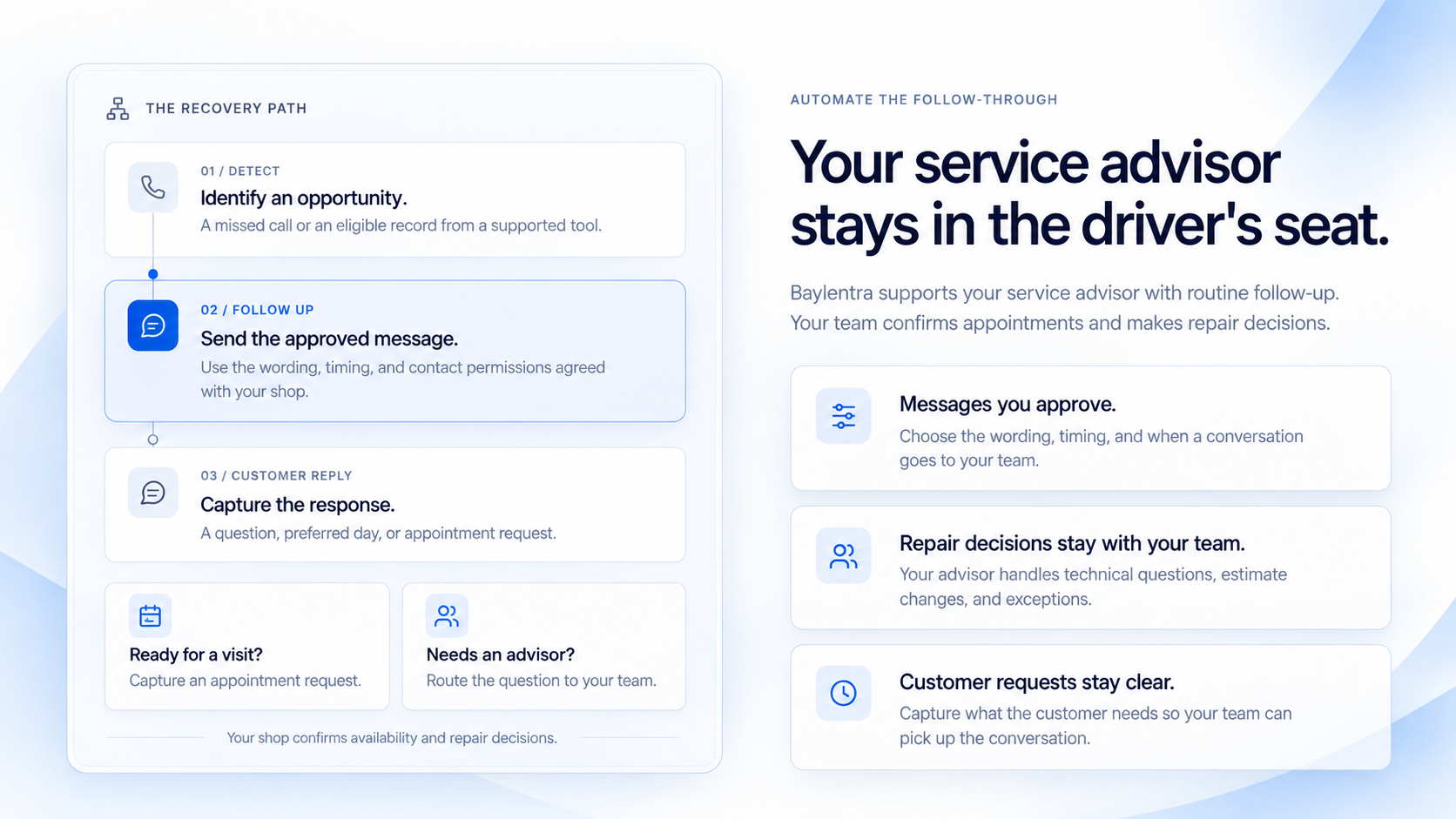
The Recovery Path: identify a missed call or eligible record, send the approved message, and capture the customer’s response. Capture an appointment request or route a question to your advisor. Your shop confirms availability and makes repair decisions.

AUTOMATE THE FOLLOW-THROUGH

Your service advisor
stays in the driver's seat.

Baylentra’s planned service would support your service advisor with routine follow-up. Your team confirms appointments and makes repair decisions.

Messages you approve.

Choose the wording, timing, and when a conversation goes to your team.

Repair decisions stay with your team.

Your advisor handles technical questions, estimate changes, and exceptions.

Customer requests stay clear.

Capture what the customer needs so your team can pick up the conversation.

The Recovery Path

Scroll to explore the complete diagram.

The Recovery Path: identify a missed call or eligible record, send the approved message, and capture the customer’s response. Capture an appointment request or route a question to your advisor. Your shop confirms availability and makes repair decisions.

OPPORTUNITY TRACKING · CONCEPT PREVIEW

A reply is a start.
A confirmed outcome
is what you track.

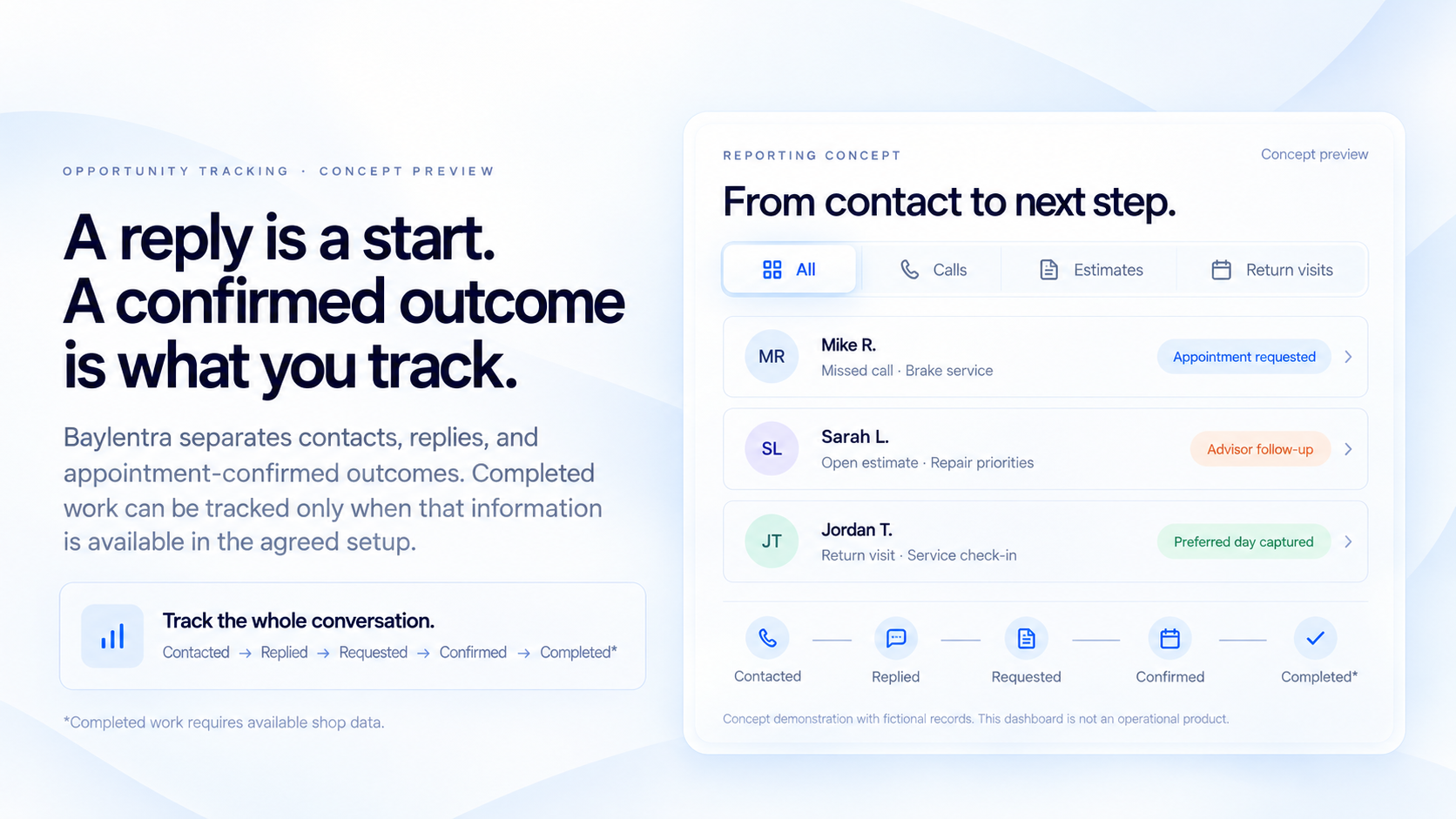
This concept separates contacts, replies, and appointment requests from confirmed appointments. Completed work can be included only when that information is available through the agreed setup.

Follow the whole conversation.
Contact → reply → request → confirmation → completed work, when available.
REPORTING CONCEPT

From contact to next step.

Concept preview

Concept demonstration with fictional records. This dashboard is not an operational product. *Completed work requires available shop data.

Reporting concept

Illustrative example. Use the filters and scroll to see the details.

IMPLEMENTATION & COMPATIBILITY

A clear setup.
Four practical steps.

Agree on what Baylentra will handle, what your tools support, and when your team takes over before going live.

  1. 01

    Choose where to start.

    Review your missed calls, estimates, and return visits. Choose the first follow-up to improve.

    ONE CLEAR PRIORITY
  2. 02

    Approve the messages.

    Agree on wording, timing, contact permissions, and when your advisor steps in.

    YOUR TEAM'S RULES
  3. 03

    Connect and test.

    Check supported connections and walk through the customer experience with your team before launch.

    A CHECKED SETUP
  4. 04

    Launch and review.

    Review replies and appointment outcomes. Adjust follow-up as your shop uses it.

    FOLLOW-UP YOU CAN REVIEW

Pricing and setup timing depend on the agreed scope and supported connections.

WORK WITH YOUR EXISTING SETUP

Check compatibility
before committing.

We start with your software, phone number, and appointment process. We check supported connections and explain any required changes before you commit. Compatibility is reviewed for each shop.

Your phone setup
Your shop software
Your appointment process
Baylentra workflow

Connection scope to be reviewed for your shop.

WHY TRUST BAYLENTRA

A clear point of contact.
A defined scope.

Baylentra specializes in follow-up automation for independent auto repair shops. Supported tools, messages, permissions, testing, and responsibilities are agreed before launch. Your team keeps control of scheduling and repair decisions.

Built around your shop's workflow.

A defined setup
We agree on the workflows, messages, and responsibilities before anything goes live.
Your approval comes first
Your shop reviews and approves customer-facing messages before they're activated.
Your team stays in control
Your staff handles scheduling and repair decisions. Baylentra focuses on the follow-up.
Intended service process.

BEFORE YOU BOOK

Good questions.
Clear answers.

What an independent shop owner should know before getting started.

Will it work with my current shop software?

It depends on the connections your tools support. We review your software and explain the available options and limits before recommending a setup.

Do I need a new phone number or different tools?

We start by reviewing your current number, phone system, software, and booking process. Any required changes depend on those tools and the workflow. We explain them before you commit.

How much does it cost, and how long does setup take?

Pricing and timing depend on the agreed workflows and supported connections. The plan includes message approval, testing, and how requests reach your team.

Who controls the messages sent to customers?

You approve the wording and timing. Setup also defines contact permissions, opt-out handling, stop conditions, and when your advisor takes over. Baylentra does not make repair decisions.

What happens after business hours?

A configured SMS follow-up can capture what the customer needs. Your shop's rules determine the next step. Appointment requests stay unconfirmed until availability is checked.

Can it follow up on estimates?

Estimate follow-up is planned, subject to access to pending estimates and a tested setup. Repair questions and estimate changes would go to your advisor.

How will I know whether it's working?

Review contacts, replies, appointment requests, and confirmed appointments separately. Completed work can be included when shop data is available. The panel above demonstrates the concept; reporting capabilities must be confirmed for your setup.

What will I get from the 20-minute demo?

Identify where follow-up stalls, see a relevant example, review your tools, and understand the available options and next steps. There is no obligation.

20 MINUTES. YOUR SHOP. A CLEARER NEXT STEP.

See what better follow-up
could look like in your shop.

Use 20 minutes to identify where follow-up stalls, see an example tailored to your operation, and review your current tools. Understand the available options and what to check next.

No obligation. Focused on your operation.
YOUR DEMO, AT A GLANCE
01
Choose a priority

Discuss where calls, estimates, or return visits lose momentum.

02
See a relevant example

Walk through follow-up and the team handoff for your operation.

03
Review tools and next steps

Review connection requirements, limits, and the next step.

BAYLENTRA · 20-MINUTE DEMO

Online scheduling
is being set up.

Demo bookings aren't available through this website yet. You can explore the recovery workflows while scheduling becomes available.

No appointment has been booked.

Explore the workflows

Privacy Policy

Effective date: October 19, 2026

Baylentra is operated by HIVY LLC ("we," "us," or "our"). This policy explains how information is handled in connection with baylentra.com, inquiries, and demo scheduling. Contact us at contact@baylentra.com with privacy questions or requests.

Information we receive

Website visits. The hosting provider processes requests to deliver and secure the website. Technical information may include your IP address, requested pages and URLs (including query parameters), request times, browser or device information, and security logs. Netlify is the planned provider for public hosting; the information retained depends on the hosting configuration.

Email inquiries. If you email us, we receive your email address, any name or business details you provide, your message, attachments, and related correspondence. Business email is handled through Purelymail and accessed through Gmail.

Demo bookings. Book a Demo opens a separate Calendly page. Calendly processes the details you submit, such as your name, email address, selected meeting time, time zone, and any answers or other contact details you choose to provide or that the booking form requests. We receive or can access booking information. Google Calendar and Google Meet are connected for scheduling and meetings and process relevant event, participant, and meeting information.

Website code, cookies, and examples

The current website code has no contact forms, payment collection, advertising pixels, or active client-side analytics. It does not set application cookies or use persistent browser storage. Page interactions and supplied UTM campaign parameters may be held temporarily in the page's memory; the code does not transmit that event queue to an analytics service or save it in persistent browser storage. Hosting requests may still include URL parameters.

These statements describe our website code, not every practice or setting of external providers. Calendly and other provider pages may use their own cookies or similar technologies when you visit them. Website conversations and reporting records are fictional demonstrations; they do not send SMS or process real repair-shop customer records.

How we use information

We use inquiries and booking information to respond to requests, arrange and conduct demonstrations, and carry out reasonable individual sales follow-up by email. Technical information supports website delivery, troubleshooting, and security. You can ask us to stop promotional follow-up at any time by emailing contact@baylentra.com.

Service providers

Information is handled through the relevant hosting, email, scheduling, and meeting providers described above to provide those services. Their own services and privacy practices also apply. See the privacy notices for Netlify, Calendly, Purelymail, and Google. The current website code does not establish or verify all account-level analytics, advertising, or data-sharing settings of these providers.

Retention and security

Information is retained as reasonably needed for the purposes described here and applicable legal, security, and recordkeeping needs. Retention varies by record type and provider settings; this policy does not specify a fixed period. No method of internet transmission or electronic storage is completely secure. Please avoid sending sensitive personal information or repair-shop customer records through general inquiries or demo booking fields.

Your choices and privacy requests

You may contact contact@baylentra.com to request access to, correction of, or deletion of your personal information, or cessation of promotional email follow-up. Depending on your location and applicable law, additional rights may apply. We may need information to verify your identity and will handle requests subject to applicable requirements and exceptions, including any need to retain legally required records. Providers' own privacy notices explain how to exercise choices relating to information they handle independently.

Policy updates

We may update this policy as our practices change. The effective date above identifies the current version. Changes requiring additional notice will be handled as applicable law requires.